
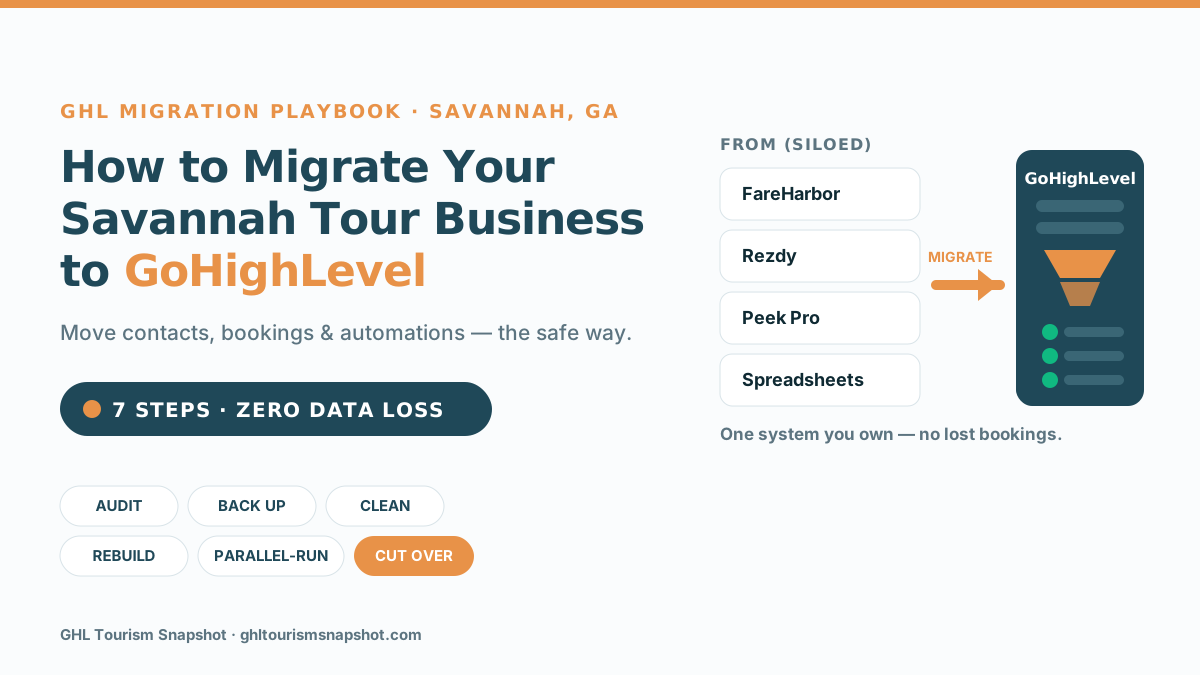
If you run tours in Savannah and you’re trapped on a reservation platform that takes a cut of every booking, owns your customer data, and won’t talk to your marketing tools, migrating to GoHighLevel means moving your contacts, booking history, pipelines, and automations into one system you actually control — and doing it in the right order so you never lose a booking. The safe version isn’t a risky “export everything and pray” weekend. It’s a seven-step, parallel-run playbook: audit, back up twice, clean and map, rebuild, connect, verify, then cut over. This guide walks through exactly that, framed for a Savannah operator.
Why Savannah tour operators are migrating to GoHighLevel
Savannah is a tour town. Trolley loops through the Historic District, ghost walks past the squares, riverboat cruises on the Savannah River, food crawls through the City Market — the demand is relentless. The county welcomed 12.9 million visitors in 2024, up 2.3% year over year, and those travelers spent $4.1 billion, according to Visit Savannah. Zoom out and Georgia just posted its third consecutive record year: 174.2 million visitors and $45.2 billion in visitor spending statewide, per Explore Georgia.
So the travelers are here. The problem most operators eventually hit isn’t demand — it’s that the tools they started with quietly work against them. Your reservation platform holds your customer list hostage. Your OTA listings hand a fifth of every sale to Viator. Your booking widget doesn’t talk to your email tool, so nobody gets a proper follow-up. You’re busy, bookings are coming in, and yet you own almost none of the machinery that produced them.
The middleman tax you’re paying to book a tour
Every booking that comes through an online travel agency carries a commission, and those commissions have been climbing. Viator’s base commission is 20% and can run to 30% with its Accelerate program (plus, as of 2025, a per-product submission fee), and GetYourGuide’s default for new operators is now 30%, per reporting from Arival. Even your own booking software takes a slice: FareHarbor’s booking fee is typically around 6%, Peek Pro’s runs 6–8%, and Rezdy’s around 3% (these are commonly reported figures, often passed to the traveler, not first-party rate cards). A booking you generate and take directly through your own GoHighLevel funnel costs you 0% in third-party commission.
That would be tolerable if OTAs were a small slice. They aren’t — and they’re growing. Arival’s research shows OTAs captured about 37% of experience bookings in 2025, while direct website bookings fell from 29% to 25% in a single year (Arival). The direction is exactly backwards for an operator’s long-term health: more of your customers are becoming Viator’s customers, not yours.
Migrating to GoHighLevel is how you flip that. Instead of renting your customer relationships from a platform, you own the contact list, the booking funnel, the follow-up, and the reviews — and you point your ad spend and SEO at a site and CRM that turn lookers into direct, commission-free bookings. (If you’re weighing that shift, our post on direct bookings for tour operators goes deeper on the economics.)
What “migrating to GoHighLevel” actually means
Migrating isn’t just exporting a contact list. A real migration moves four things:
- Your data — contacts, past travelers, booking history, tags, notes, and deposit/payment records.
- Your pipelines — the stages a booking moves through, from inquiry to deposit to confirmed to post-trip.
- Your automations — confirmation texts, reminder sequences, review requests, win-back campaigns.
- Your connections — the booking platform, payment processor, calendar, and OTA listings that feed the system.
“Zero data loss” is the standard because the cost of getting it wrong is brutal. Gartner estimates poor data quality costs the average organization roughly $12.9 million a year (Gartner) — and a sloppy migration is one of the fastest ways to poison a clean database: duplicated contacts, dropped booking history, broken merge fields that send “Hi {first_name}” to 4,000 travelers. The whole point of the playbook below is to make that impossible by never deleting the source system until the new one is proven.
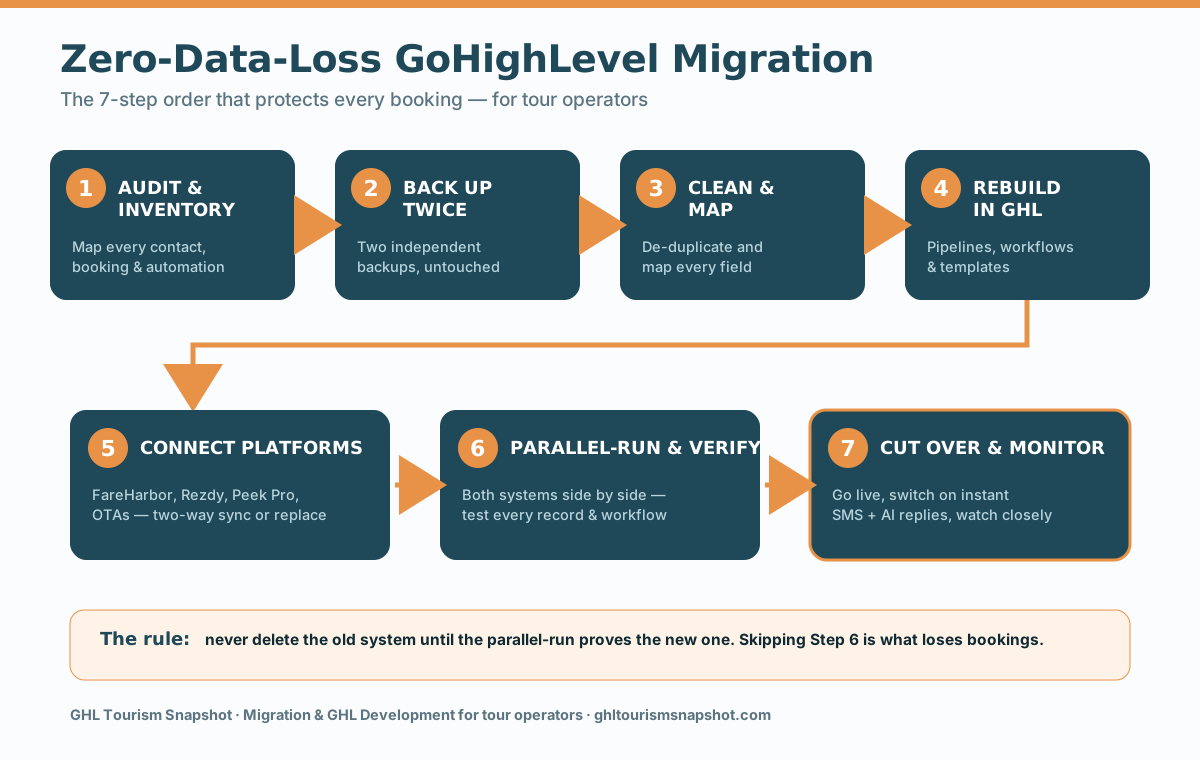
The 7-step zero-data-loss migration playbook
This is the exact sequence a disciplined migration follows. Do it in order — the order is what protects your bookings.
Step 1 — Audit and inventory your current system
Before you export a single row, map what you have. Where do contacts live? What booking history is stored in FareHarbor, Rezdy, Peek Pro, or that spreadsheet? Which automations actually fire, and which broke months ago? List every pipeline stage, every message template, every integration and payment record. You can’t migrate cleanly what you haven’t inventoried — and the audit almost always surfaces dead weight you’ll be glad to leave behind.
Step 2 — Export and back up everything (twice)
Pull everything out via API or CSV export — contacts, bookings, notes, tags, transaction history — and store two independent backups before you change anything. This is your undo button. As long as the source data exists untouched in two places, no step that follows can be catastrophic. Skipping this is how “quick migrations” become horror stories.
Step 3 — Clean, de-duplicate, and map your fields
Migration is the best chance you’ll ever get to fix your data. De-duplicate the traveler who’s in there five times, standardize phone formats for SMS, merge stale tags, and drop junk. Then map each source field to its GoHighLevel equivalent — “trip date” to a custom field, “deposit paid” to a pipeline value, and so on. Clean-and-mapped is what makes the import land right instead of arriving as mush.
Step 4 — Rebuild pipelines, workflows, and templates in GHL
Now recreate the machine inside GoHighLevel: the booking pipeline, the confirmation and reminder sequences that cut no-shows, the review requests, and the win-back journeys. This is where a rebuild beats a straight copy — you get to rebuild the automations better than the originals, often folding in things the old platform never supported. (A done-for-you snapshot can shortcut most of this; more on that below.)
Step 5 — Connect your booking platform or OTAs
Decide per tool: replace it, or connect it. If you’re keeping FareHarbor, Rezdy, Bokun, Checkfront, Peek Pro, or your Viator/TripAdvisor listings, build a two-way sync so every booking creates or updates a GHL contact with the trip, seat count, and deposit fields — and pipeline changes push back. This is exactly the kind of integration work our GHL development team does, and it’s what makes your automations fire on real-time, complete data instead of guesses.
Step 6 — Parallel-run and verify, record by record
Do not cut over yet. Run both systems side by side for a stretch and verify every migrated record and every automation. Send test bookings through. Confirm the confirmation text fires, the reminder lands, the review request goes out, the deposit tags correctly. This parallel-run is the single step that separates a clean migration from a disaster — it’s also the step nervous DIYers skip to “save time,” and it’s the one that costs them bookings.
Step 7 — Cut over, switch on speed-to-lead, and monitor
Once every record checks out, point new inquiries at GoHighLevel, then turn on the reason you did all this: instant response. Contacting a web lead within five minutes rather than thirty makes you 21× more likely to qualify it, per the Lead Response Management study — yet the average business takes 42 hours and 23% never reply at all (Harvard Business Review). With GHL live, a 9 p.m. inquiry about tomorrow’s ghost tour gets an instant SMS and a booking link before the traveler closes the tab. Pair it with an AI voice agent that answers every call 24/7 and the gap closes completely. Then watch the first two weeks like a hawk and fix anything that surfaces.
Exactly what to migrate
When operators ask “what actually moves over?”, here’s the checklist. Everything on it should survive the migration intact:
- All contacts — active leads, past travelers, and email/SMS subscribers, with consent status preserved.
- Booking and trip history — which tours, when, party size, and revenue, so segmentation and win-back still work.
- Deposits and payment records — so financial history isn’t orphaned.
- Tags and segments — the labels that power your campaigns.
- Pipelines and stages — rebuilt to match (or improve on) your booking flow.
- Message templates — confirmations, reminders, review asks, rebooking offers.
- Automations/workflows — recreated and tested, not assumed.
- Reviews and reputation flows — because 88% of consumers favor a business that replies to all its reviews, versus 47% for one that never does (BrightLocal).
5 migration mistakes that cost operators bookings
Almost every painful migration comes down to one of these:
- No backup (or only one). If the source data isn’t sitting untouched in two places, a single bad import is unrecoverable. Back up twice, always.
- Migrating dirty data. Importing duplicates and broken phone numbers doesn’t clean itself — it just moves the mess and breaks your SMS automations. Clean before you import.
- Deleting the old system too early. Cancel FareHarbor the day you “finish” and you’ll discover the one field that didn’t map after it’s gone. Keep the source live through the parallel-run.
- Skipping the parallel-run. The most common and most expensive mistake. Untested automations fail silently, and you find out when three travelers no-show because the reminder never fired.
- Migrating the data but not the follow-up. Moving contacts without rebuilding speed-to-lead and reminder sequences means you’ve changed tools without fixing the leak. The automations are the point.
Migrating with vs. without the playbook
An operator exports contacts on a Saturday, imports them into GHL, and cancels FareHarbor to stop the bill. Duplicate contacts flood the database. Booking history didn't come over, so win-back segments are empty. A broken merge field texts 'Hi {first_name}' to the whole list. Two reminder workflows never got rebuilt, and the next weekend's kayak tour has three no-shows. There's no backup to roll back to.
The same operator audits, backs up twice, cleans and maps the data, and rebuilds pipelines and automations in GHL. Both systems run in parallel for two weeks while every record and workflow is verified with test bookings. Only then does the cutover happen — new inquiries get an instant reply, reminders fire, reviews get requested, and FareHarbor is retired last. Zero bookings lost.
DIY vs. done-for-you migration
You can absolutely migrate yourself if you have the time and the appetite for the details. Here’s the honest comparison for a small-to-mid Savannah operator.
| What matters | DIY migration | Done-for-you (GHL dev team) |
|---|---|---|
| Up-front cost | “Free” (your time — often 40–80+ hours) | Project fee (from ~$3K depending on scope) |
| Risk of data loss | High if you skip backups/parallel-run | Low — zero-data-loss process is the deliverable |
| Booking-platform integrations | You wire up (or fight) the APIs | Built and tested for you |
| Automations rebuilt | Only the ones you know how to build | Rebuilt — often better than the originals |
| Time to live | Weeks of nights-and-weekends | 2–4 weeks, managed |
| Downtime risk | You’re the only safety net | Parallel-run + verification built in |
| Who fixes it if it breaks | You | 30-day bug-fix warranty |
DIY makes sense if you’re technical, patient, and your data is small and clean. For most operators mid-season — when every lost booking is a real seat on a real departure — a managed, zero-data-loss migration is cheaper than the bookings a botched weekend would cost. Our GHL development and migration service runs the full playbook: audit, clean, rebuild, connect, parallel-run, cut over, with full IP transfer and a bug-fix warranty. Need a hand keeping it running afterward? A dedicated GHL VA can drive the account once it’s live, and for anything GHL can’t do natively, custom software fills the gap.
What a GHL migration costs and how long it takes
Straight numbers. A fixed-price GoHighLevel build or migration typically starts around $3,000 and scales with complexity (a simple platform-to-GHL move sits at the low end; a full booking-and-manifest rebuild sits higher). Prefer to pay as you go? Hourly development runs $75/hour with no minimums. Most migrations complete in 2–4 weeks depending on data volume — the parallel-run is what takes the time, and it’s time well spent.
Set that against the alternative. If OTA commissions of 20–30% are skimming even a handful of bookings a week, or slow follow-up is losing leads that a five-minute reply would have won, the migration pays for itself well inside a season — and every commission-free direct booking after that is margin. CRM done right has long returned multiples of its cost; Nucleus Research’s classic analysis put it at $8.71 back for every $1 spent (Nucleus Research, 2014, source). The trick is getting the data in cleanly so the CRM can actually do its job.
Frequently asked questions
Will I lose my booking history and past travelers when I migrate to GoHighLevel?
Not with a zero-data-loss process. The whole point of the playbook is that your source system stays untouched (with two backups) until the new GoHighLevel account is fully verified. Contacts, booking history, deposits, tags, and notes are exported, cleaned, mapped, imported, and then checked record by record during a parallel-run before anything is switched off. Done in that order, nothing is lost.
Do I have to cancel FareHarbor, Rezdy, or Peek Pro to use GoHighLevel?
No. Many Savannah operators keep their booking engine and connect it to GoHighLevel with a two-way sync, so bookings flow into GHL and the automations fire on complete data. Others do a full move off a platform they've outgrown. Both work — we scope which is right for you during the audit.
How long does a GoHighLevel migration take?
Most migrations take 2–4 weeks, depending on how much data you have and how many integrations are involved. The bulk of that time is the parallel-run and verification stage, where both systems run side by side and every record and automation is tested before cutover. That step is what guarantees no lost bookings, so it's worth the time.
How much does it cost to migrate a tour business to GoHighLevel?
Fixed-price migrations and builds typically start around $3,000 and scale with complexity, or you can engage hourly development at $75/hour with no minimums. A straightforward platform-to-GHL move sits at the low end; a full booking-and-manifest rebuild with custom integrations sits higher. You get a written scope and fixed quote before any work begins.
Can you migrate me and also build the automations I need?
Yes — that's the standard engagement. We migrate your data cleanly, then rebuild your pipelines, reminder sequences, review requests, and win-back campaigns in GoHighLevel, often better than the originals. If you want the fastest path, the done-for-you Tourism Snapshot installs 60+ prebuilt tour-operator workflows, and we migrate your data into it.
Is this only for Savannah tour operators?
No. We migrate and build for tour operators, activity providers, and travel agencies across the USA. This guide is framed for Savannah because it's a dense, high-competition tour market where owning your customer data and responding fast make an outsized difference, but the same zero-data-loss playbook applies anywhere.
About the author
Desmond Clarke is a GHL Agency Strategist based in Savannah, Georgia. He runs a boutique GoHighLevel agency serving travel and hospitality clients — from harbor cruise companies to multi-day expedition outfitters — and came up through paid media and conversion copywriting, so he looks at every automation through the lens of cost-per-booked-seat. On the blog he translates agency tactics — onboarding snapshots, platform migrations, and proving ROI to operator clients — into plain language any owner can act on.
Editorial note: GHL Tourism Snapshot is a GoHighLevel automation and services product, not a travel agency. We don’t sell, book, or guarantee any tour. Statistics are drawn from the cited sources and reflect industry or study averages (with publication years noted where relevant); your results will vary with your data, offer, market, and traffic. Booking-platform and OTA fees are commonly reported figures, not official rate cards — confirm current terms with each provider.
Related posts
- Direct Bookings for Tour Operators — the commission-free economics migration unlocks.
- Tourism Snapshot vs. DIY — build it yourself or install the prebuilt system you migrate into.
- Speed to Lead for Tour Operators — why the first five minutes decide the booking.
- AI Voice Agents for Tour Operators — 24/7 phone coverage to switch on after cutover.
- GoHighLevel VA for Tour Operators — who drives the account once it’s live.
Ready to move off the platform that’s holding your data hostage? See GHL Development & Migration, explore the Tourism Snapshot pricing, or talk to a real person about your Savannah tours.