
To build a fast, bookable tour website in Dallas, build it static-first so it loads in under 2.5 seconds on mobile, wire real Dallas destination pages and schema in from day one, and connect a booking path straight to your CRM — because in a mobile-first, high-competition market, speed and local visibility are what turn a phone searcher into a confirmed seat instead of a bounce back to Viator. That’s the whole playbook in one sentence. The rest of this guide walks you through it step by step, with the current data behind every decision and the exact pages, targets, and tools that make a Dallas tour site actually book trips.
This is written for tour and activity operators in Dallas–Fort Worth — Deep Ellum food-tour guides, Bishop Arts walking tours, JFK and downtown history tours, day trips out to the Hill Country — and for the agencies that build for them. It’s a systems guide, not a developer flame war: what to build, in what order, and why, so browsing turns into a booked departure.
Why a fast website is a booking decision in Dallas
Most of your buyers meet your website on a phone, mid-decision, with two or three competitors one tap away. A tourist standing near Klyde Warren Park deciding on a food tour, a family in a hotel off the Tollway picking tomorrow’s activity — they’re not going to wait for a hero image to arrive. If your page stalls, they’re gone before they ever see your tours.
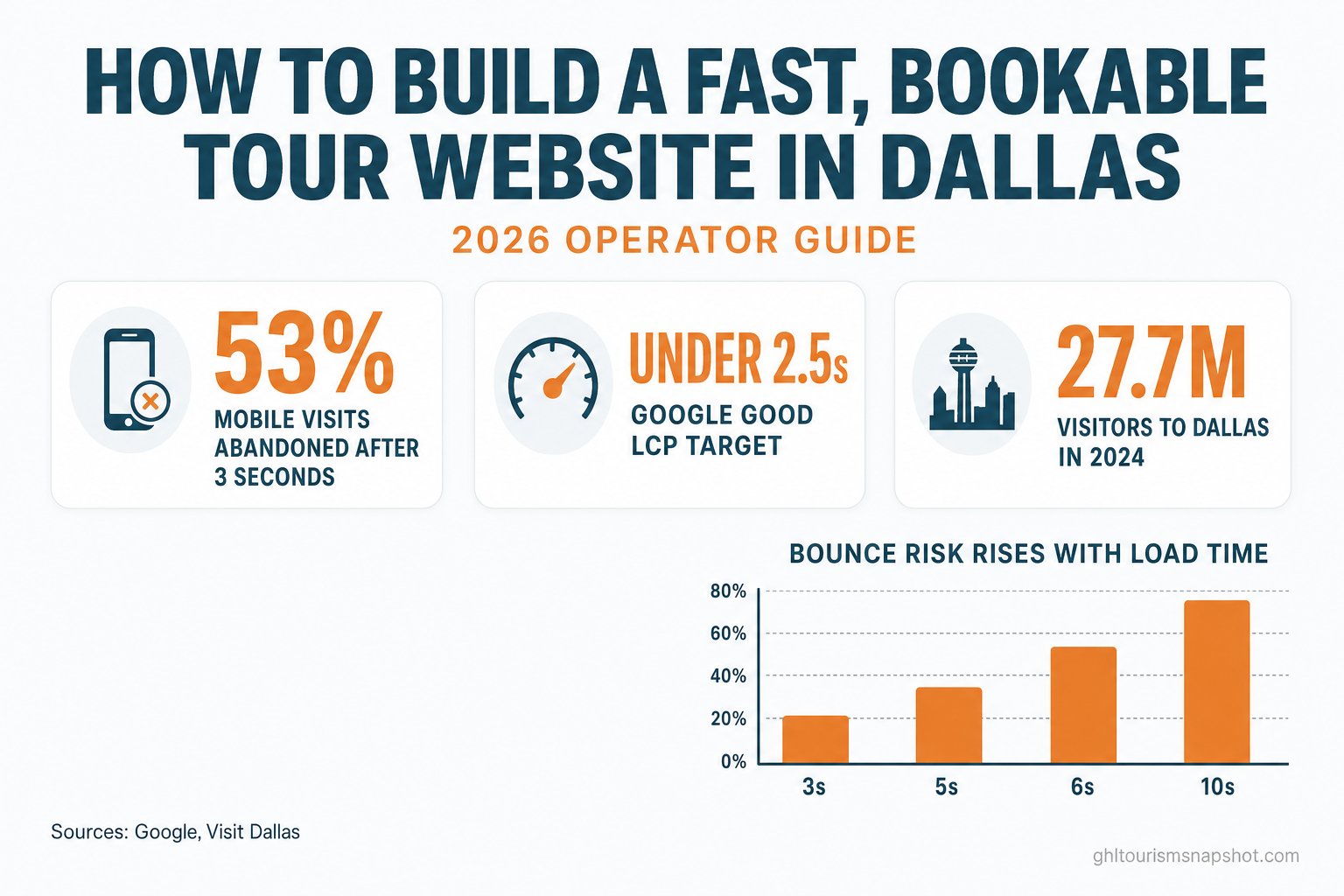
The data on this is old enough to be settled and blunt enough to plan around. Google’s mobile research found that 53% of mobile visits are abandoned when a page takes more than three seconds to load (Google). And it isn’t a cliff at three seconds — it’s a slope the whole way. Using a model built on real mobile e-commerce data, Google and SOASTA found that as page load time grows, the probability a visitor bounces climbs steadily:
Increase in bounce probability as mobile page load time rises from a 1-second baseline. Source: Think with Google / SOASTA, 2017.
The flip side is that speed you gain converts into money. In the Milliseconds Make Millions study, Deloitte and Google measured a ~10% lift in travel-site conversions from a mere 0.1-second improvement in mobile speed — the largest category effect they recorded (web.dev). Portent’s analysis of more than 27,000 landing pages found conversion rates peak when pages load in zero to two seconds and fall off with every added second after that (Portent). For a tour operator, a “conversion” is a booked seat. Speed is not a technical nicety; it’s the width of the door.
The Dallas context: big demand, mobile searchers
Dallas is not a market where demand is the problem. Visit Dallas reports the city welcomed more than 27.7 million visitors in 2024, generating roughly $10.9 billion in economic impact and supporting over 60,000 jobs (Visit Dallas). Statewide, the Office of the Governor’s Travel Texas division reports a record ~$97.5 billion in visitor spending in 2024, supporting about 1.3 million Texas jobs (Travel Texas).
The travelers are here and they’re spending. The question is who they find first. And in 2026, “finding you” happens on a phone — mobile devices now drive roughly 70% of traffic to travel and hospitality websites (Statista), and phones have overtaken desktops as the preferred device for booking travel outright (PYMNTS). A Dallas tour site that isn’t fast and clear on a mid-range Android over hotel Wi-Fi is invisible at exactly the moment the booking decision is made — and that traveler books through whoever loaded first, which is usually a marketplace charging you a commission for a customer who was already searching for your tour.
What “fast and bookable” actually means
“Fast” isn’t a vibe; Google gives you numbers to hit. The Core Web Vitals — the metrics Google uses to measure real page experience — set the “good” bar at:
- LCP (Largest Contentful Paint) ≤ 2.5 seconds — how quickly the main content appears.
- INP (Interaction to Next Paint) ≤ 200 milliseconds — how fast the page responds when tapped.
- CLS (Cumulative Layout Shift) ≤ 0.1 — how little the layout jumps around while loading.
Those thresholds come straight from Google Search Central, and page experience is a confirmed part of Google’s ranking systems (Google). Here’s the opening: according to the HTTP Archive’s 2025 Web Almanac, fewer than half of sites pass Core Web Vitals on mobile, with LCP the hardest metric to clear (HTTP Archive). Most of your Dallas competitors are failing the same test. A site that clears it — a 90+ Google PageSpeed score on mobile and desktop — both ranks better and converts more of the traffic it gets.
“Bookable” is the other half, and it’s where a lot of fast sites still fail. A site can load instantly and still leak every visitor if there’s no obvious next step: no per-tour page with this season’s real price, no way to see the total for four adults and two kids on a Saturday, no form that lands in the system your reservations desk actually watches. Fast gets them to look. Bookable gets them to commit.
The 7-step build, in order
Here’s the sequence that produces a fast, bookable Dallas tour site. Do it in this order — each step depends on the one before it.
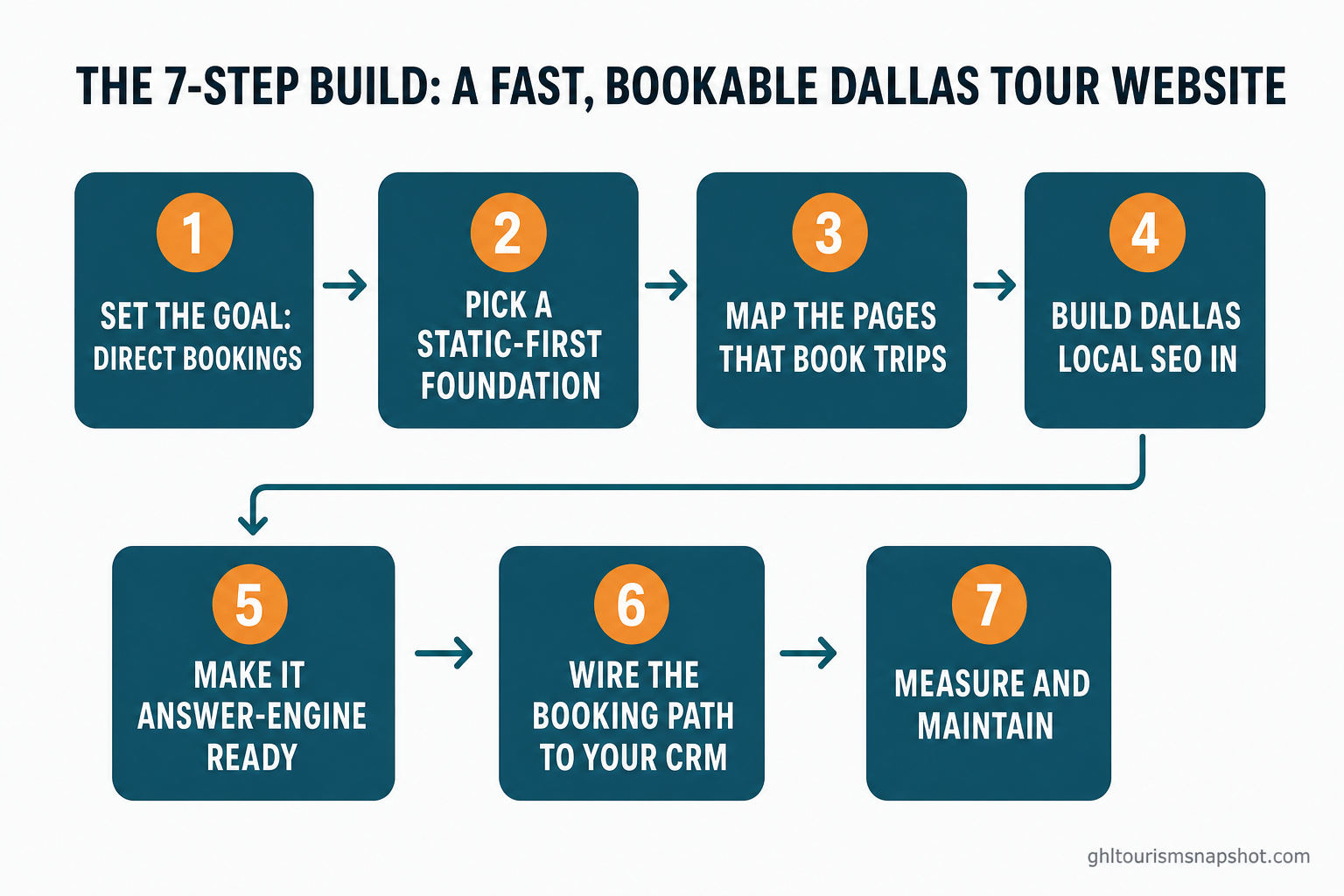
Step 1 — Set the goal: direct bookings, not a brochure
Before anyone touches a design, decide what the site is for. A brochure site describes your tours; a booking machine converts a stranger into a paid seat. That single decision changes everything downstream — the layout leads with your signature tour and a clear price, every page has a booking path, and success is measured in confirmed departures, not page views. The prize is real: only about 33% of experiences are booked online today, versus ~64% of travel overall, and the tours-and-activities market is growing fast, from roughly $253 billion in 2024 toward $342 billion by 2029 (Arival / Phocuswright). The direct-booking share is still being decided.
Share booked online, experiences vs. travel overall — the direct-booking gap. Source: Arival / Phocuswright, Travel Experiences 2026.
Step 2 — Pick a static-first foundation
The platform decides your ceiling on speed. A page-builder site (a heavy WordPress theme with a stack of plugins, or a Wix/GHL drag-and-drop build) ships a lot of JavaScript the browser has to download and run before anything appears — which is exactly what pushes LCP past 2.5 seconds on mobile. A static-first framework like Astro ships almost no JavaScript by default and serves pre-built pages from a global edge network, so it routinely clears 90+ PageSpeed. We compared the platforms head-to-head in our Astro vs WordPress vs Wix breakdown for tour operators — the short version is that architecture, not tuning, is what wins the mobile speed test.
| Static-first (Astro) | Page-builder (WordPress/Wix/GHL) | |
|---|---|---|
| JavaScript shipped | Almost none by default | Heavy runtime + plugins |
| Typical mobile PageSpeed | 90–100 | 30–60 |
| Hosting | Global edge/CDN | Single origin server |
| Slows over time? | No | Yes, as plugins pile up |
Step 3 — Map the pages that book trips
A template with one photo swapped out won’t rank or convert. Map a real page for every way a traveler searches:
- A home page built around your signature Dallas tour, with price and a booking button above the fold.
- One page per tour — food, history, nightlife, Bishop Arts, day trips — each with per-person pricing, what’s included, and its own booking path.
- Meet-the-guides with real people and real photographs. Design look drives credibility, and travel buyers are especially design-sensitive (Stanford / Fogg et al.).
- Practical pages travelers actually search — what to wear, where to meet, parking near Deep Ellum, best time of year.
- A booking / enquiry page wired to your CRM.
Step 4 — Build Dallas local SEO in from day one
This is the single biggest lever a local operator has. Give Google and the AI engines real, crawlable destination pages — “food tours in Deep Ellum,” “history tours in downtown Dallas,” “things to do in Bishop Arts” — each with its own title, meta description, and LocalBusiness/Service schema declaring the areas you serve. Keep your Google Business Profile current with real departure photos and answered questions. Our local SEO playbook for tour operators goes deep on this; the principle is simple: the operator with a real page for the exact thing a traveler typed is the one who gets found without paying a marketplace for the introduction.
Step 5 — Make it answer-engine ready
Travelers increasingly ask ChatGPT, Perplexity, and Google’s AI Overviews to plan the day — “best food tour in Dallas,” “is a Deep Ellum walking tour worth it.” To be the operator those assistants name, write answer-first passages (lead with the answer, then explain), add clean schema, and ship a correct sitemap.xml, robots.txt, and llms.txt so AI crawlers can read every tour page. We cover the whole approach in GEO for tour operators: getting cited by AI answer engines. This is the same being-found-everywhere logic as local SEO, extended to the assistants doing the searching now.
Step 6 — Wire the booking path to your CRM
Speed and visibility are wasted if the enquiry dies in an inbox. Two pieces matter here. First, a trip-total calculator — travelers are already doing the math for their party size and dates, so let them get your number while you get their party size and dates. Second, every form submission delivered into your CRM by direct API, Zapier, or Make, so enquiries land where your team already works. Then answer instantly: response speed is its own conversion lever, which we break down in speed to lead for tour operators and the true cost of manual online booking.
Step 7 — Measure and maintain
Launch is the start, not the finish. Check your real mobile scores in Google PageSpeed Insights and Search Console, keep seasonal and group rates current (a price that’s a week stale costs you the booking), and refresh destination content as your routes change. A fast site that’s left to rot slows down and drifts out of the rankings; a maintained one compounds.
What a slow or DIY site really costs
Add up what a slow, dated, or half-built site quietly costs a Dallas operator, and the math gets uncomfortable. Every mobile visitor over the three-second mark is a coin flip you’re losing more than half the time. Every traveler who books through a marketplace instead of your own site hands over a commonly reported 20–30% commission on a customer who was already looking for your tour (Arival) — margin gone on a booking you nearly had for free. And every hour you spend paying an agency by the ticket to move a departure time or load next season’s pricing is overhead a modern managed site simply doesn’t carry.
The DIY path has its own hidden bill: to build and maintain a genuinely fast static site yourself, you need real development skills, and the time you sink into learning a framework is time you’re not running trips. That’s the honest trade-off — DIY is cheaper in dollars and far more expensive in the hours and expertise it demands. For most operators, the point of a website is bookings, not becoming a part-time developer.
Getting an Astro-fast Dallas site without coding
You don’t have to choose between “fast and technical” and “easy and slow.” The done-for-you route gives you Astro’s speed with none of the code: our Get a Website service builds your Dallas tour site static-first for a guaranteed 90+ PageSpeed, ships real destination pages with local SEO and schema, includes a trip-total calculator and CRM-wired enquiry forms, and runs fully managed on Cloudflare’s edge — crashes, SSL, patches, and uptime are ours, not yours.
Pricing is from $97/month plus a one-time $499 build fee, and the build fee is charged only after your site is live and you’re happy with it. Higher tiers add an AI receptionist and chat widget that answer and book the enquiries you’d otherwise miss, plus a content engine that keeps publishing the Dallas destination pages that compound into rankings. If you’d rather see the whole ladder first, the pricing page lays it out, or you can book a quick call and we’ll tell you honestly whether a rebuild is worth it for your business. Either way — direct bookings are the point, and a fast, local, bookable site is how you win them back from the marketplaces.
FAQ
How fast does my Dallas tour website actually need to be?
Aim for Google's 'good' Core Web Vitals on mobile: Largest Contentful Paint under 2.5 seconds, Interaction to Next Paint under 200 milliseconds, and Cumulative Layout Shift under 0.1 — which in practice means a 90+ Google PageSpeed score. It matters because Google found 53% of mobile visits are abandoned when a page takes over three seconds to load, and fewer than half of all sites currently pass Core Web Vitals on mobile. Clearing the bar puts you ahead of most Dallas competitors on both ranking and conversion.
Why is a static-first platform like Astro faster than WordPress or Wix?
Because it sends the browser far less to do. Astro ships almost no client-side JavaScript by default and serves pre-built pages from a global edge network, so the main content appears fast even on mobile data. WordPress can be quick but slows as plugins accumulate, and Wix and GHL-built sites carry heavy page-builder runtimes that often land content-rich pages in the 30–60 PageSpeed range on mobile. The gap is architecture, not tuning.
Do I need to know how to code to get an Astro tour website?
To build and maintain one yourself, yes — Astro is a developer framework, not a drag-and-drop editor. Most tour operators prefer a done-for-you build. Our Get a Website service builds and hosts your Astro tour site, handles updates through support requests, and keeps it managed, so you get the speed without touching code.
What makes a fast website 'bookable' and not just pretty?
A booking path on every page. That means per-tour pages showing this season's real per-person price, a trip-total calculator so a traveler can price their party and dates on the spot, and enquiry forms wired straight into the CRM your reservations team already uses — then an instant response. Fast gets them to look; a clear, wired booking path gets them to commit.
How do I get found by travelers searching for Dallas tours specifically?
Build real, crawlable local pages: a dedicated page for each tour and each Dallas area you operate in — Deep Ellum, Bishop Arts, downtown — each with its own title, meta description, and LocalBusiness or Service schema declaring the area served, plus a Google Business Profile you keep current. Add answer-first copy and clean structured data so AI answer engines like ChatGPT and Google AI Overviews can quote you too. That combination is what surfaces you for 'things to do in Dallas' without paying a marketplace.
How much does a done-for-you fast tour website cost?
Our Get a Website service starts at $97/month plus a one-time $499 build fee, and you only pay the build fee after the site is live and you're satisfied. The monthly covers managed Cloudflare edge hosting, your domain, SSL, and five revision requests a month. Higher tiers add an AI receptionist, chat widget, and a content engine that publishes Dallas destination pages every week.