
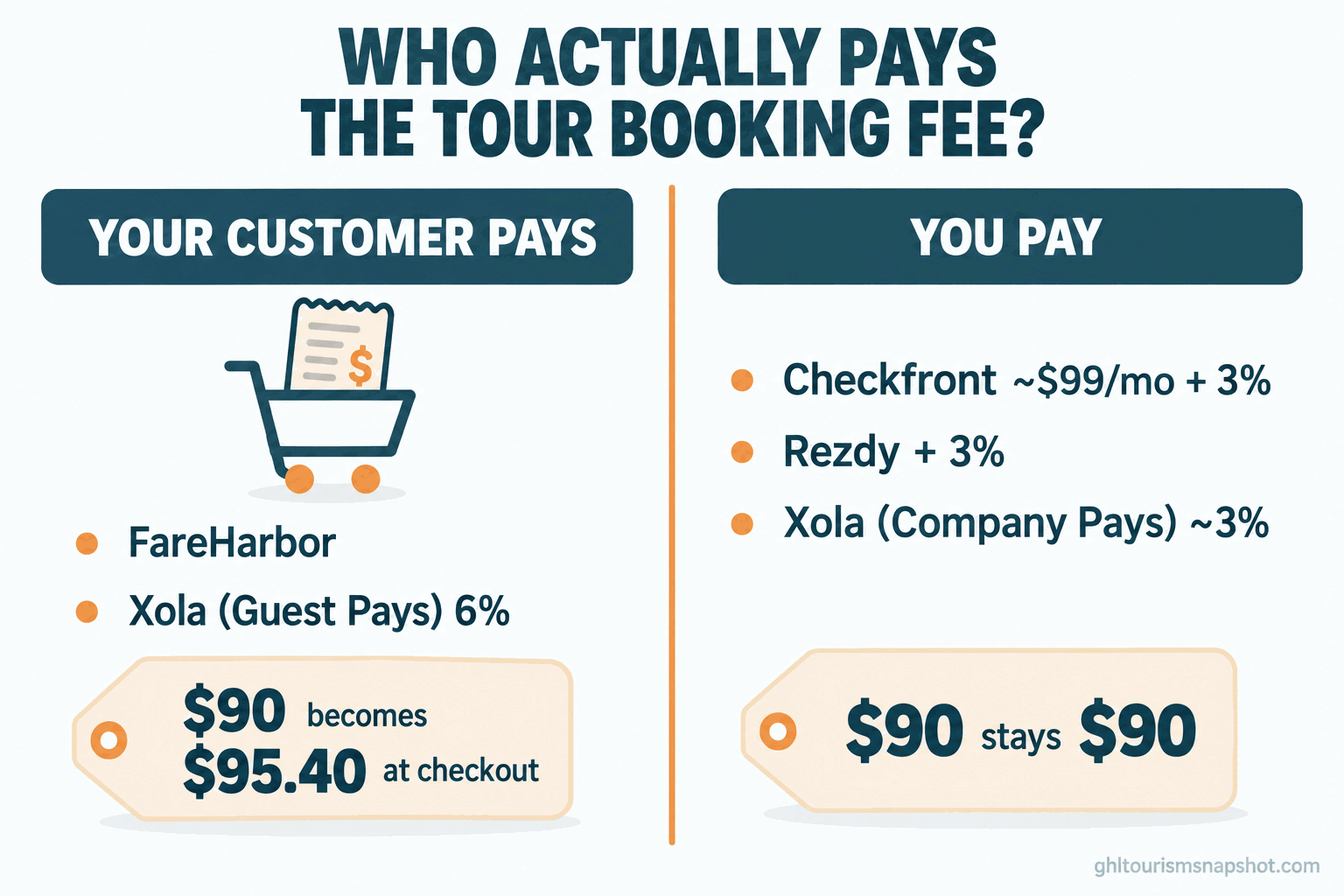
A traveler is about to book your sunset kayak tour. Card out, the seat is $90. Then the total updates to $95.40. She squints at the extra five dollars and change and wonders if she is being nickel-and-dimed. That little bump is a booking fee, and most operators have no idea their software is adding it to the customer’s total at the last second.
Here is the short answer. A tour booking “fee” is not really a price, it is a decision about who pays: your customer at checkout, or you out of your margin. Xola and FareHarbor lean toward charging your customer (Xola’s guest-pays setting is a flat 6 percent, per Xola’s own help docs). Checkfront and Rezdy lean toward a published subscription near $99 a month plus about 3 percent that you usually absorb. Xola is unusual because it lets you flip a switch and choose. So before you compare rates, answer one question: do you want a clean checkout price and a cost you control, or a lower software bill that quietly lands on the person booking? This post walks through every major tool, who pays in each, and the questions to ask before you sign.
The fee is a “who,” not a number
Most comparison articles line up the percentages and declare a winner. That misses the thing that hits your business. Two tools can both charge “6 percent” and cost you wildly different amounts, because one adds it to your customer’s total and the other takes it from your deposit.
There are three models, and every booking tool is one of them.
Customer pays. The software adds a service fee on top of the price you set. Your $90 tour shows up as $95.40 at checkout, you keep your full $90, and the traveler never sees the extra until the last screen. This is FareHarbor’s default and Xola’s “Guest Pays” setting.
You pay. The platform charges you a subscription plus a percentage of each booking, out of your money. Your $90 tour stays $90 to the customer, and you net roughly $87. This is how Checkfront and Rezdy work by default.
Your choice. A few tools let you decide, and some let you split the fee. Xola has a literal setting for who absorbs it; Rezdy lets merchants absorb, pass on, or split it. (Rezdy pricing)
Neither model is free. The only question is whether you protect your sticker price and eat a predictable cost, or keep your software bill near zero and let the fee ride on your traveler.
Who pays, tool by tool
Percentages marked “reported” come from third parties, not the vendor’s own page, so treat them as planning numbers and confirm your own rate.
| Tool | Monthly | Booking fee | Who pays by default |
|---|---|---|---|
| Xola | No fixed subscription | 6% guest-pays, or ~3% company-pays | Your choice (setting) |
| FareHarbor | None published | Up to ~6% direct (reported) | Your customer |
| Peek Pro | Quote only | Not published | Usually your customer (reported) |
| Bokun | Free, then $49 / $149 / $499 | 1.5% / 1.25% / 1%, 0% on Viator | You (or absorb/pass) |
| Checkfront | ~$99 single plan | ~3% online | You |
| Rezdy | $49 / $99 / $249 | ~3% online | You (absorb, pass or split) |
Each figure is sourced in that tool’s own section below. For the full dollar-by-dollar teardown of all six, we ran that in what tour booking software actually costs in 2026.
Xola: the one that lets you choose
Xola is the most interesting tool here, because it does not hide the decision from you. It hands it to you as a setting.
On Xola’s “Flex Standard, Guest Pays” setup, the platform adds a 6 percent service fee on the booking subtotal, and the guest pays it. Xola’s own help page is blunt: the fee is excluded from your revenue reports because, in their words, “it’s not your revenue.” It goes to Xola, while the card processing fee goes to Stripe and comes out of your money. (Xola Guest Pays) Flip the account to “Company Pays” and a fee closer to 3 percent is charged to you instead, so your checkout price stays exactly what you set. (Company Pays) You trade a higher internal cost for a cleaner customer experience.
That toggle hides a trap. Plenty of operators leave the default in place and never realize their travelers have paid a 6 percent surcharge on every booking for two years. If you run Xola, open your fee settings, confirm which mode you are in, and decide on purpose, not by accident.
FareHarbor: no price page, fee on the customer
FareHarbor, owned by Booking Holdings, is the most popular tool in this category and the hardest to pin down. It publishes no price, no plan table, just a “Book a demo” button. You cannot know your rate until a rep tells you on a call.
What we know is the model: no monthly subscription, and a per-booking fee usually added to the customer at checkout. Third-party guides report it at up to roughly 6 percent on direct bookings and about 2 percent on OTA and partner-API bookings. (CaptainBook) That 6 percent is widely repeated but not published by FareHarbor, so get your number in writing before you sign.
The pitch is seductive: no bill to dread, polished setup, a trusted brand. The catch is that the fee rides on your customer and scales with every dollar you charge. You never feel it as an invoice, which is why it is easy to ignore while it inflates your sticker price for years. We did the head-to-head math in FareHarbor vs Checkfront vs Rezdy.
Peek Pro, Bokun, Checkfront and Rezdy
Peek Pro is the other tool that will not show you a price: quote-based, demo-first, no free plan. (Spotsaas) The fee is generally reported as passed to the customer, like FareHarbor, but any percentage you read online is secondhand. We dug into why there is no price page in Peek Pro pricing explained.
Bokun, a Tripadvisor company, flips the usual trade. It has a free tier and three paid plans at $49, $149 and $499 a month, with booking fees of 1.5, 1.25 and 1 percent, and 0 percent on bookings through Viator. (Bokun) The catch lives in the heavily limited free plan, covered in the Bokun free plan explained.
Checkfront keeps it simple: a published plan near $99 a month plus about 3 percent on online bookings, defaulting to you. (Checkfront)
Rezdy publishes tiers at $49, $99 and $249 a month plus roughly 3 percent online, and lets you absorb, pass on, or split the fee. (Rezdy) It is built for distribution to resellers and OTAs.
The pattern holds: the transparent tools charge you, the quote-only tools charge your customer. That link is not a coincidence.
What a customer-facing fee really costs you
Operators who like the “no subscription” tools say the same thing: “The fee is on the customer, so it is free to me.” It is not free. It raises your effective sticker price, because travelers compare totals, not base prices. And it bites when people abandon: it appears on the final screen, the most fragile moment in the funnel.
A 6 percent guest-pays fee is only about $2.70 on a $45 kayak seat, but it is $7.20 on a $120 food tour and $18 on a $300 charter berth. Eighteen dollars of surprise on a $300 booking makes a traveler close the tab to “think about it,” and that usually means booking nothing. The fee that was “free to you” cost you the sale.
Three operators, three ticket prices
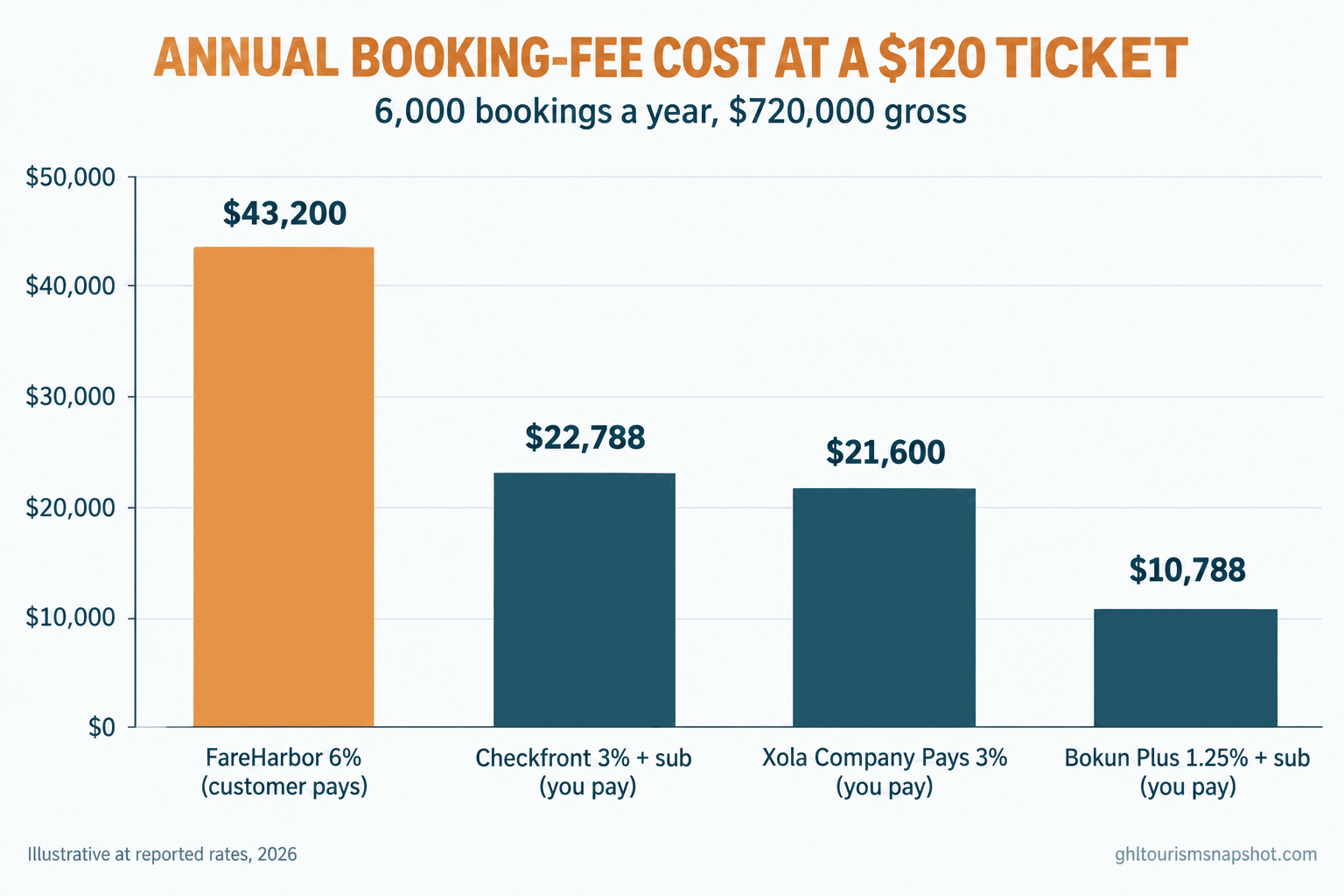
The “who pays” question lands differently depending on what you sell, because a percentage fee rises with every dollar you charge. Hold volume steady at 6,000 bookings a year and watch what a 6 percent guest-pays fee piles onto your customers as the ticket climbs.
The solo operator: a $45 kayak seat or escape-room spot. A 6 percent guest-pays fee is roughly $2.70 per booking, small enough that the “no subscription” pitch is genuinely attractive, and a free tier like Bokun’s can make sense while you are tiny.
The mid-size operator: a $120 food, brewery or ATV tour. The $720,000 shop in the chart. A 6 percent guest-pays fee adds about $43,200 to travelers’ totals a year; a company-pays 3 percent costs you about $21,600. This is the band where operators quietly bleed, having adopted a guest-pays tool when small while the surcharge grew with their prices.
The large operator: a $300 private charter or premium expedition. A 6 percent fee is about $108,000 a year riding on your customers, and an $18 surcharge at checkout is a real conversion drag. No high-ticket operator should run a passed-through 6 percent fee without hard-negotiating it first.
The rule of thumb: the higher your ticket, the more a clean checkout price matters. Run your ticket times 6,000 times the fee before any demo, and the number decides it.
The migration cost nobody quotes
Switching tools is never just the new subscription. Before you move for a better fee model, price the move itself: rebuilding your catalog and pricing, re-embedding and testing the booking widget on mobile, moving past customer records (some platforms make exporting your own list harder than it should be), retraining whoever answers the phone, and running both systems in parallel for a few weeks so nothing double-books.
For a small shop that is a week of work spread over a month. None of it shows up in a quote, and it is the most common reason operators stay on a tool whose fee they resent. A model that saves $20,000 a year is worth a week of migration pain, but only if you actually do it.
Where each model breaks
Every model has a failure mode. Know them before you sign into one.
Guest-pays breaks at a high ticket and on repeat guests. The surcharge invisible on a $45 seat becomes sticker shock on a $300 booking, and it lands on your loyal repeat customer exactly like a cold stranger. Move your best guests to direct repeat bookings so fewer seats ever hit the fee.
Company-pays breaks on thin margins and low volume. With a handful of cheap bookings a month, a ~$99 subscription plus 3 percent can cost more than a guest-pays tool. Do the annual math at your real volume, not the vendor’s example.
Quote-only tools break on bargaining power. When price is a negotiation, your rate depends on how hard you push. Get competing quotes and a rate in writing, and re-check every renewal.
Free tiers break on the fine print. Bokun’s free plan looks great until you hit the missing website widget or the blocked non-Viator integrations. Read exactly what it excludes first.
Every model breaks the same way on one thing: they all charge you per booking forever, including on customers you already earned. No booking tool is built to fix that, because fixing it means fewer bookings running through their fee.
Steal this: the demo questions and a fee line
Walk into any demo, especially a quote-only one, with these written down. They turn a vague sales call into a number.
If a rep will not answer question one in writing, that is your answer. And if you run a guest-pays tool and want to keep it, be honest with the traveler so the fee is not a last-second surprise. One clear line near your booking button does the job:
It is plain, it is true, and it moves the surprise from the final screen to before the traveler has invested effort, which is exactly where a surprise does the least damage.
Who each one is right for
A guest-pays tool (FareHarbor, Xola Guest Pays) suits low tickets where you want the lowest software bill and travelers are not comparing you against a cleaner checkout next door.
A company-pays tool or setting (Checkfront, Rezdy, Xola Company Pays) suits mid or high tickets where you care about your sticker price and would rather pay a predictable cost than tax every booking.
Bokun suits you if a lot of your volume comes through Viator, which carries no Bokun fee, and you can live with the free plan’s limits.
Peek Pro and FareHarbor quotes are worth getting only after you hold the transparent tools’ numbers, so you walk in with a ceiling.
Whichever you pick, the biggest win is not the tool. It is sending fewer seats through any per-booking fee at all, by owning your repeat business instead of renting it, the case we make in direct bookings for tour operators and repeat bookings for tour operators.
Objections, answered straight
“The fee is on my customer, so why should I care?” Because travelers compare totals, not base prices, and the fee shows up at the most fragile moment in the sale. It raises your effective price and nudges abandonment, especially at a high ticket. It is your problem even when it is your customer’s line item.
“I already pay for FareHarbor and setup was painless. Why switch?” Maybe do not, if your tickets are low and it is working. But get your fee in writing and run the annual number. Plenty of mid and high-ticket operators find the switch pays for itself in a season.
“What about the card processing fee?” Card processing, around 2.9 percent plus $0.30, lands on you no matter which platform you run, so it is a wash across all of them. What differs between tools is the software booking fee on top, and who pays it.
FAQ
Tour booking fees: the questions operators ask
Who pays the booking fee, me or my customer?
It depends on the tool and the setting. FareHarbor and Xola's Guest Pays mode add the fee to your customer at checkout. Checkfront and Rezdy charge you by default. Xola lets you choose with a Company Pays setting, and Rezdy lets you absorb, pass on, or split it. Always confirm which mode your account is in.
What is Xola's booking fee?
On Xola's Guest Pays setup, the service fee is 6 percent of the booking subtotal, paid by the guest, per Xola's own help docs. Switch to Company Pays and a fee closer to 3 percent is charged to your account instead. The card processing fee to Stripe is separate and always paid by the business.
Does FareHarbor really charge the customer?
That is the reported model: no monthly subscription, and a per-booking fee added to the customer at checkout, up to about 6 percent on direct bookings and roughly 2 percent on OTA bookings. FareHarbor does not publish these numbers, so confirm your rate in writing.
Why won't Peek Pro and FareHarbor show a price?
Both run a demo-first, quote-based sales process with no public pricing page, so your rate is a negotiation. Small operators often accept the first number offered. Get competing quotes and a written rate, and re-check at every renewal.
Is a customer-facing fee actually bad for me?
It is a hidden cost. It raises your effective sticker price and appears at checkout, the most fragile point in the funnel, which nudges cart abandonment. The damage grows with your ticket: on a $300 charter, a 6 percent fee is an $18 surprise right before the traveler commits.
How do I stop paying a fee on my repeat customers?
No booking tool solves this, because they all charge per booking. The fix is to capture every guest's contact details and run automated follow-up, review and win-back messages so your best travelers rebook direct instead of through a fresh paid booking. That is what the Tourism Snapshot sets up.
Back to that kayak traveler with her card out. The five dollars she squinted at was not your pricing. It was your software, charging her to book the tour you already sold her. You cannot make a booking fee vanish, but you can decide who carries it, keep your checkout price honest, and bring the guests who already love you back direct, where no per-booking fee ever touches them again.